


Understand the flight
Review carry and total distance, launch angle, apex and launch direction. Look for repeatable patterns across a session rather than judging your swing on one number.
Hast du ein Konto?
Logge dich ein, damit es beim Checkout schneller geht.
CLUB REHAB / GOLF TECHNOLOGY
A range session becomes more useful when you can connect the result to the swing. The SC4 Pro brings distance, speed, trajectory and spin into one portable system, with a built-in screen that keeps your key numbers in view.
Swing Caddie SC4 Pro
DESIGNED FOR YOUR GAME
Review carry and total distance, launch angle, apex and launch direction. Look for repeatable patterns across a session rather than judging your swing on one number.
Swing speed, ball speed and smash factor help you compare effort with impact. VoiceCaddie S adds richer shot analysis, including spin-axis, side-spin and dispersion information.
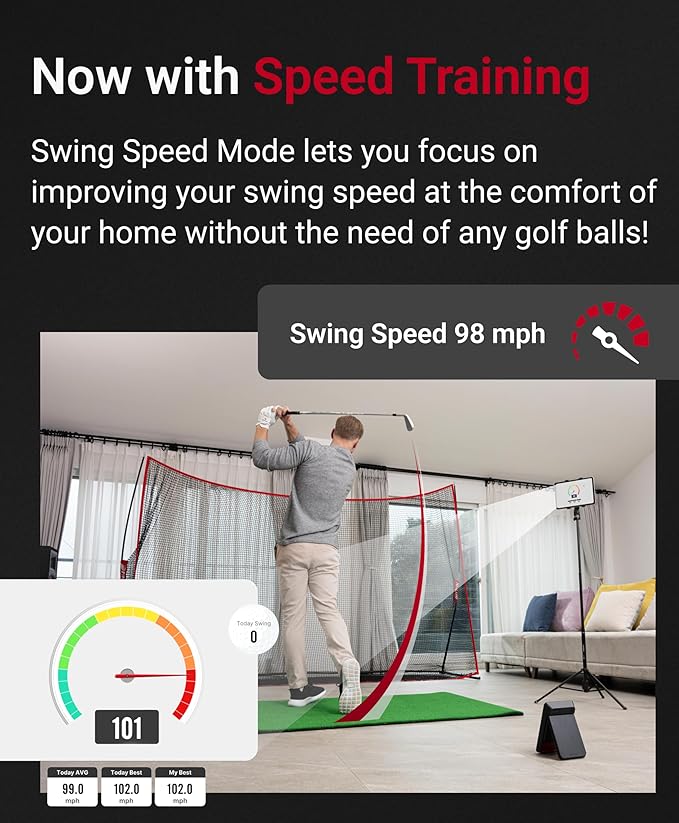
Move between practice, target and swing-speed work. Connect to the VoiceCaddie S virtual range, or use compatible third-party simulation software for a course-play experience.

A CLOSER LOOK
The rear stand supports a self-contained setup, while the magnetically stored remote keeps club and target changes close at hand. Spoken distance feedback lets you stay with the shot instead of walking back to the display.


THE TECHNICAL PROFILE
Model-specific specifications for Swing Caddie SC4 Pro.
| Measurement system | K-band 24 GHz Doppler radar |
|---|---|
| Carry range | 15–370 yards |
| On-device data | Distance, swing speed, ball speed, smash factor, launch angle, apex, launch direction and spin rate |
| App | VoiceCaddie S; Bluetooth connection |
| Simulator compatibility | E6 Connect / Optishot Orion; separate software requirements apply |
| Battery | 7,500 mAh rechargeable lithium-ion |
| Battery life | Approximately 10 hours, depending on conditions |
| Full recharge | Approximately 6 hours from empty |
| Dimensions | 4.88 × 7.59 × 1.14 inches |
| Weight | 20.79 oz |
| Operating temperature | 32–122°F |
| Position | 5 feet behind the ball; base level with the hitting surface |
Battery figures and measurement ranges are manufacturer specifications. Actual performance varies with setup, conditions and use.
BEFORE YOUR FIRST ROUND
Allow approximately 5 feet from the monitor to the ball. For a net or screen, Voice Caddie recommends another 10 feet of ball flight, plus safe swing and installation clearance.
Set the base level with the hitting surface. Line the ball up with the red mark on the unit and aim down your target line; careful placement matters to the result.
VoiceCaddie S supports Apple and Android devices. E6 Connect compatibility is for iOS and PC, not Android; additional course content or other simulator services may require paid plans.
QUESTIONS, ANSWERED
No. The built-in display and voice feedback support standalone practice. A compatible phone, tablet or computer is needed for app-based analysis or simulation.
Use standard regulation golf balls. The SC4 Pro is not designed to evaluate non-standard practice balls; no special marked balls are required.
The core kit includes the launch monitor, remote, USB cable and manual. Phones, tablets, net, screen and hitting mat shown in use are not included. A carry case is sold separately.
THE RIGHT FIT
Connected practice + simulation
Advanced flight metrics, VoiceCaddie S and compatible course simulation.
You’re viewing this modelDeeper practice analysis
Launch angle, apex and MySwingCaddie history; no course-simulator support.
Explore SC300iStraightforward standalone practice
Core distance and speed data, four practice modes and no app pairing.
Explore SC200 Plus